Intelligence Cloud home

First Alert · Intelligence, Routed

The alert now has a name on it.

Seen in Minutes, Act in Time.

When a call needs attention, the people responsible for that team know within minutes of hang-up. One of them takes it, or hands it to the person who can fix it, and everyone can see where it stands.

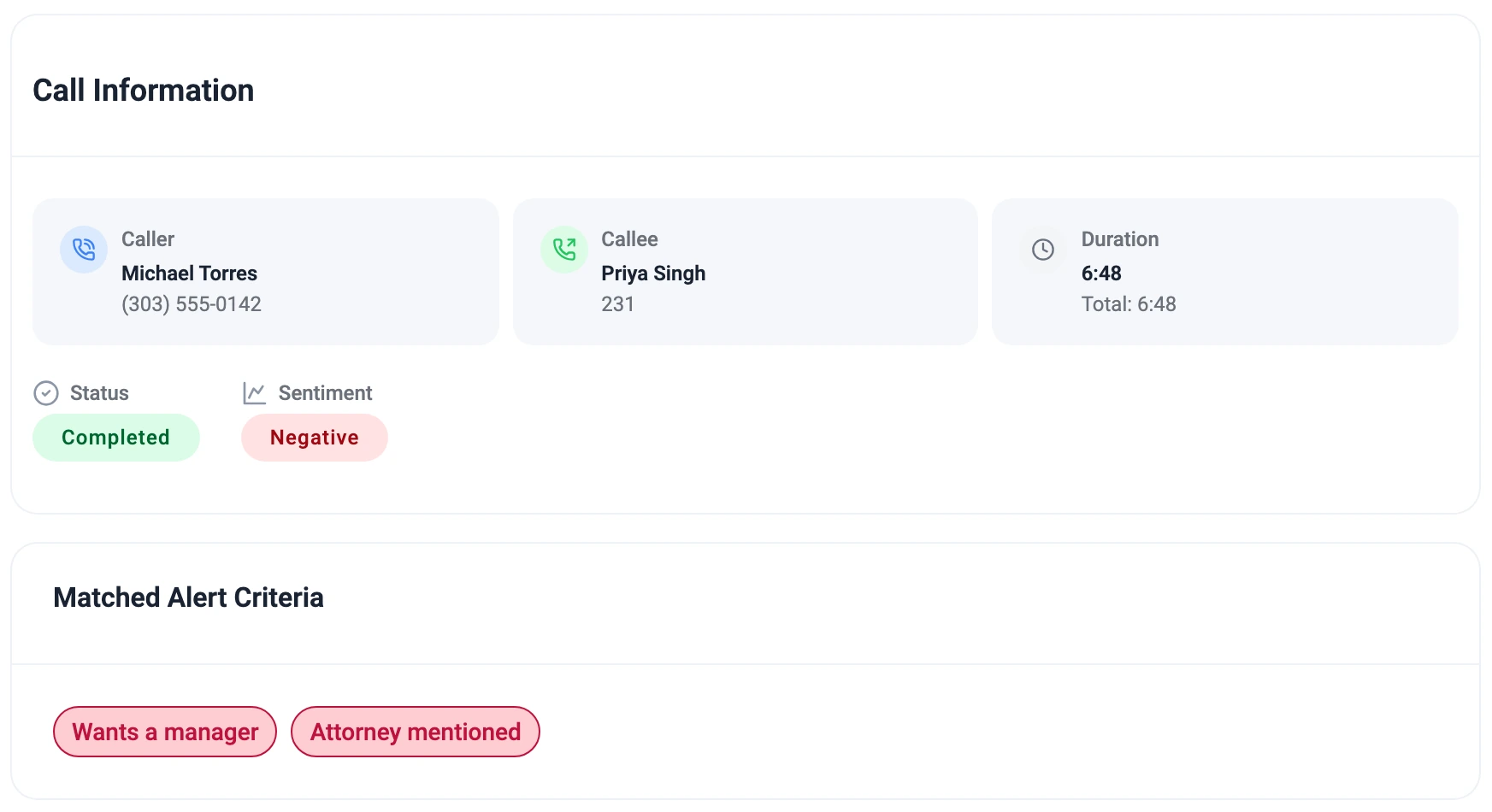
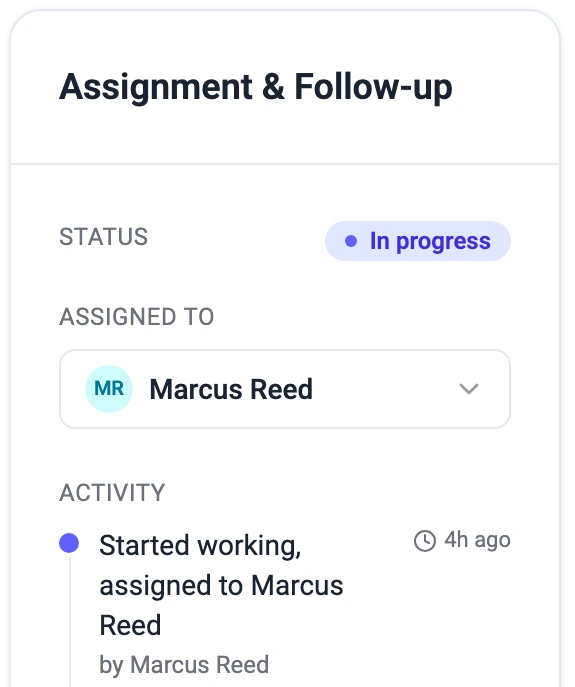
Part of an alert in First Alert: the caller Michael Torres, Priya Singh who took the call, the duration, a negative sentiment, and the two rules that raised the alert, Wants a manager and Attorney mentioned. The Assignment and Follow-up panel on the same alert: status In progress, assigned to Marcus Reed, and the first step he took.

Everything about the call, on one page.

The person who opens an alert has what they need to act before they pick up the phone.

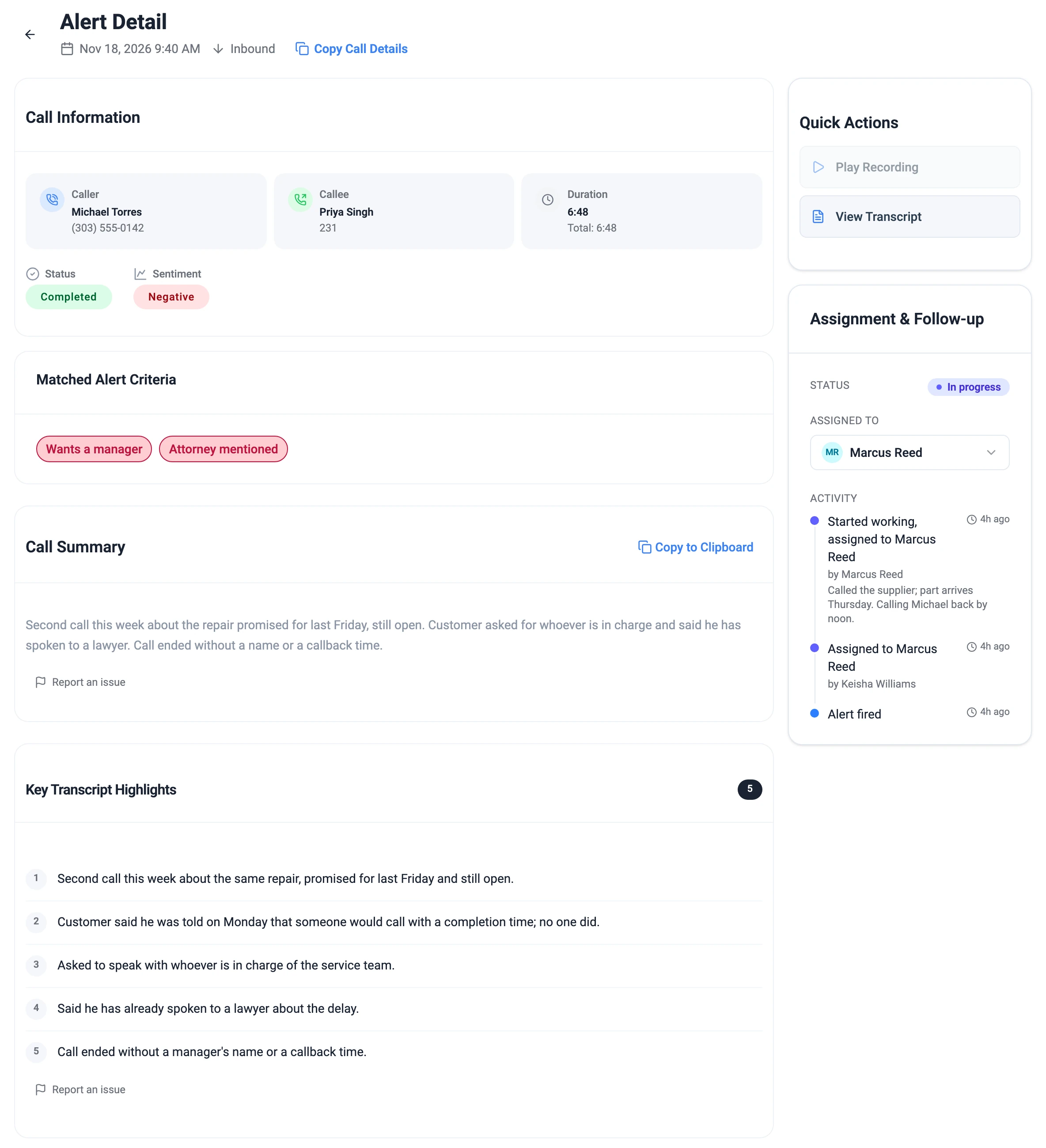
An alert open in First Alert. Call information shows the caller, the person who took the call and the duration. Below are the rules that raised the alert, the call summary and the key moments from the transcript. On the right are buttons to play the recording and view the transcript, and an Assignment and Follow-up panel showing the status In progress, the person assigned, and an activity trail of each step with who took it and when.
Who called, and who took the call
Names and numbers, the time, the direction and how long it ran.
Why it was raised
The alert rules the call matched, shown by name, with the words that matched.
What happened
A written summary: who called, why, what was said and how it ended.
The moments that mattered
Key points from the transcript, so the turn in the call is one glance away.
The customer in their own words
The full transcript and the recording, one click each.
Who has it
Status, owner and every step taken so far, with who took it and when.

It finds the manager. The manager is not hunting for it.

Alerts arrive by email and in the app, within minutes of hang-up. Each person chooses which alert types reach their inbox, and can add a daily or weekly digest.

Each morning, managers and executives get a snapshot of the alerts still open, with the status of each and who has it.

Your business decides what an email carries: the full call details, or a link that opens behind sign-in.

The right alert reaches the right department.

Each team has its own alert rules and its own groups of people who receive them. A person can belong to groups on one team or on many. That is the whole model, and it fits the way the business is organized.

A subscription service business with support, sales and onboarding teams

Each support team's alerts go to its team lead. The same alerts also reach the directors above, so a customer threatening to leave is seen by someone with the authority to keep them.

Support teams get a Records request alert when a customer asks for their records to be sent elsewhere. Onboarding does too, with rules written for its own calls. Sales hears every mention of a competitor. The retention owner gets the calls that signal a customer is on the way out.

A multi-site business with departments at every site

Each department at each site runs the same alerts, so the managers work from the same picture. A department manager receives the alerts for their department. The site manager receives them for every department at the site.

Executives see every alert in the app, and choose the few that reach their inbox. At Northfield they chose two: a customer who mentions an attorney, and a customer who mentions a regulator.

ExecutivesEvery alert in the app. Legal mentions by email, within minutes of hang-up.
  • North siteSite manager receives alerts for every department at North
    • ServiceService manager: threats, upset customers, missed callbacks
    • SalesSales manager: threats, upset customers, competitor mentions
    • Front deskAlerts go to the service manager, who can act on them
  • South siteSite manager receives alerts for every department at South
    • ServiceService manager
    • SalesSales manager
  • BillingShared team for both sites
    • AccountsTeam lead: billing disputes, upset customers

Sees every teamOne manager's alertsA team and its alert groups

Delegate, move faster, act with confidence

An alert about a call goes to the manager who can help, with the call attached. Leaders stop being the relay for every problem, because each department has its own. When something does need the top of the business, it arrives there in minutes with the facts in hand.

Hand it to the person who can fix it.

The person with the authority to see an alert is rarely the one with the job, the order or the account in front of them. Assigning the alert closes that gap.

  1. NewThe alert is raised. Anyone who received it can take it or assign it from the alert.
  2. In progressThe owner is told by email and in the app, and gets the alert with its full call: summary, transcript and recording.
  3. EscalatedIf it needs more authority, the owner passes it up with a note. The new owner is told the same way.
  4. Resolved or dismissedClosed with a note on what was done, or dismissed with the reason. Every step is on the alert, with who and when.

One person, one call

Assigning an alert gives the assignee that alert and its call, even when it came in to a team they are not part of. Their view of everything else stays exactly as it was.

Ask who can hear a call, and the answer fits in one sentence.

Enterprise-ready
The alert and its callSummary, transcript, recording and the reason it was flagged
  • People who received the alertSee the alert and its call. Can assign it.
  • The assigneeGets the alert and the full call record. Can reassign or escalate it. Sees none of the caller's other calls.
  • Everyone else on the teamNothing new. Assignment changes nothing they see.

The manager sees it closed.

The alert list shows the status and the owner of each alert. Filter by team, by status or by who has it, including the ones nobody has picked up. One view shows the open follow-ups across the teams you run.

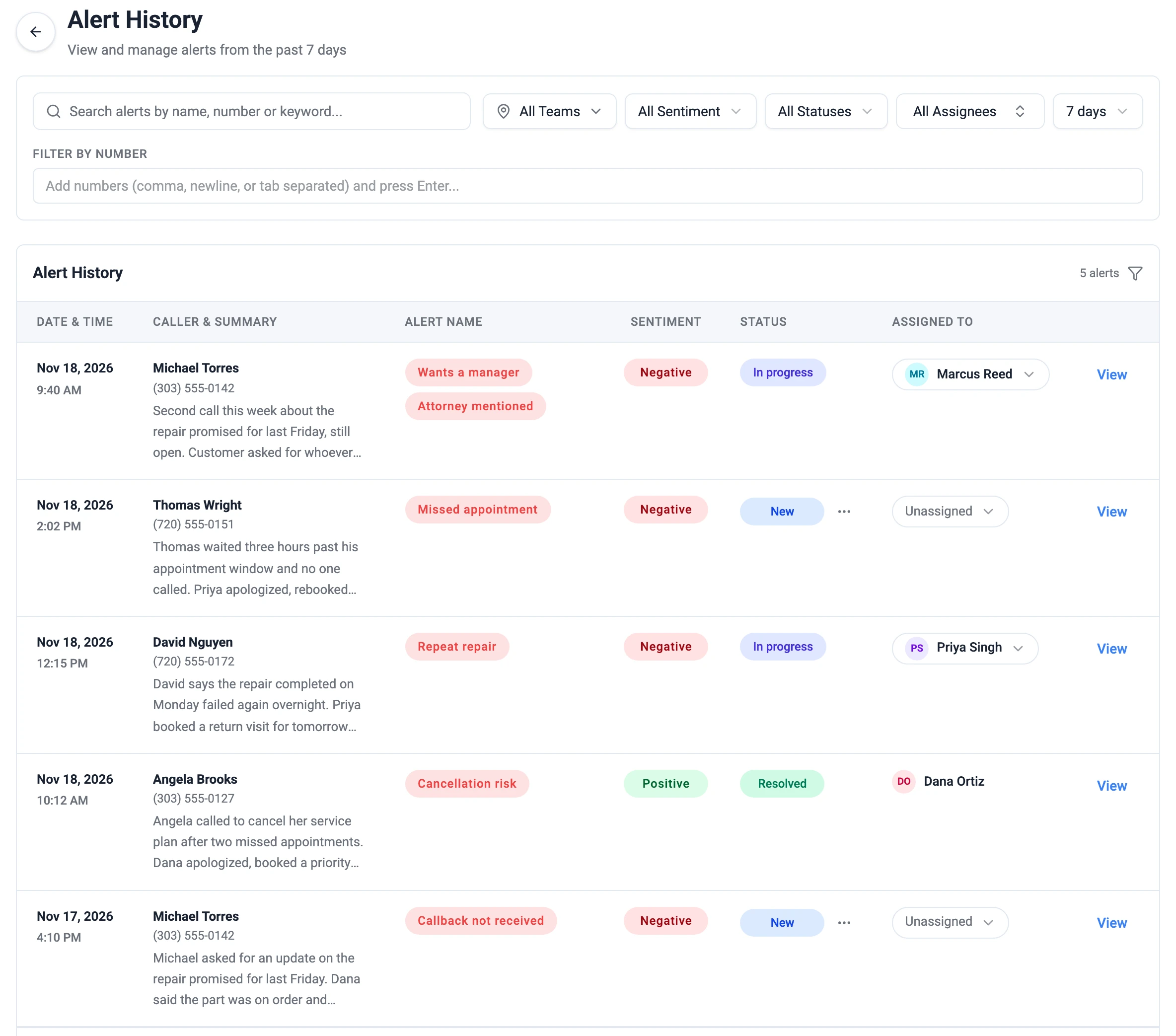
The alert list. Filters across the top for team, sentiment, status, assignee and date. Each row shows the caller with a short summary, the alert name, the sentiment, a status of New, In progress, Escalated or Resolved, and the person the alert is assigned to.

The calls businesses ask to hear about.

Alert rules are written for each business and each team. These are in use at service businesses and multi-site businesses.

Cancellation risk
The customer says they are cancelling, not renewing, or going to someone else.
Attorney mentioned
A lawyer, a lawsuit or legal action came up on the call.
Regulator or formal complaint
The customer named a regulator, a consumer body or small claims.
Public review
A one-star review or a warning to others was mentioned.
Wants a manager
The customer asked for someone in charge.
Angry customer
The call was heated and ended unhappy.
Repeat repair
The same problem, back again after it was meant to be solved.
Callback not received
The customer says nobody called them back, or they keep getting transferred.
Long wait
A job, an order, a visit or a ticket has gone quiet and the caller is asking why.
Records request
The caller asked for their records or history to be sent somewhere else.
Price asked, no reply
The caller asked for a price or a quote and says nobody came back to them.
Billing dispute
A charge was questioned, refused or called a mistake.
Missed appointment
The customer waited past the appointment window, or nobody came.
Competitor mentioned
The caller named another company. Sales hears about it the same day.

Alerts reach the systems your teams work in.

Each alert is sent as an event when it is raised, within minutes of hang-up. Open a ticket in your ticketing system, add a note to the account in your CRM, or start a workflow in your automation platform.

The API gives the same alerts back on request, by team, by rule, by date or by caller.

Developer API and SDK
Case · North site - Service queueOpened 9:50 am from an alert

Second call about an open repair. Asked for whoever is in charge and mentioned a lawyer.

FieldValue
CustomerMichael Torres, (303) 555-0142
AlertWants a manager, Attorney mentioned
TeamNorth site - Service
FromCall to North site - Service, Wednesday 9:40 am

The link on the case opens the alert and its call: summary, transcript and recording.

The next upset caller reaches a manager within minutes of hang-up.

Your provider sets up the teams and the alert rules with you.

Talk to your provider