Intelligence Cloud home

How teams use it

Each alert gets an owner. The manager sees it closed.

Team leads and managers see their teams' calls, the alerts that need someone and the tasks still open. They assign, escalate and close from one list, and coach from the call itself.

Keisha's Wednesday: two hand-offs before ten, and the angry call closed by 10:20.

Keisha Williams is the operations manager. The snapshot arrives before she does, and a quarter of an hour sorts the morning. The rest of the day runs on the list.

  1. 7:45 am

    The morning snapshot. One alert from yesterday has nobody on it: Grace Holloway, callback not received.

  2. 7:52 am

    She plays the moment. Grace was told someone would call with a time for her visit. Nobody did.

    She assigns it to Dana Ortiz, who took Grace's first call, with a note. Dana has the email and the call.

  3. 8:15 am

    The team huddle. The task list is on the screen. Two overdue callbacks each get a name and a time.

  4. 9:50 am

    An alert from North site - Service: Michael Torres, on his second call about the same repair, wants whoever is in charge. He has spoken to a lawyer.

    At 9:54 she assigns it to Marcus Reed. Marcus has the email and the full call.

  5. 10:20 am

    Marcus has called Michael with a completion date. He resolves the alert with a note, and it shows closed on her list.

  6. 12:00 pm

    A look at what is due this afternoon. Each callback has an owner.

By ten o'clock, each new alert has a name on it.

Alerts reach you within minutes of hang-up, by email and in the app. The list shows each one's status and owner, and one filter shows the ones nobody has picked up yet.

  1. Take itAssign it to yourself when the call needs you.
  2. Hand it overAssign it to the person with the job, the order or the account. They get an email, a notice in the app and the full call.
  3. Pass it upEscalate it with a note when it needs more authority. The person above becomes the owner and is told the same way.
  4. Close itResolve it with a note on what was done, or dismiss it with the reason. Each step stays on the alert, with who and when.
The alert and its callSummary, transcript, recording and the reason it was flagged
  • Managers who received itSee the alert and its call. Can assign it.
  • The person you hand it toGets the alert and the full call record. Can reassign or escalate it.
  • Everyone else on their teamNothing new. The hand-off changes nothing they see.

In the huddle, the task list is the agenda.

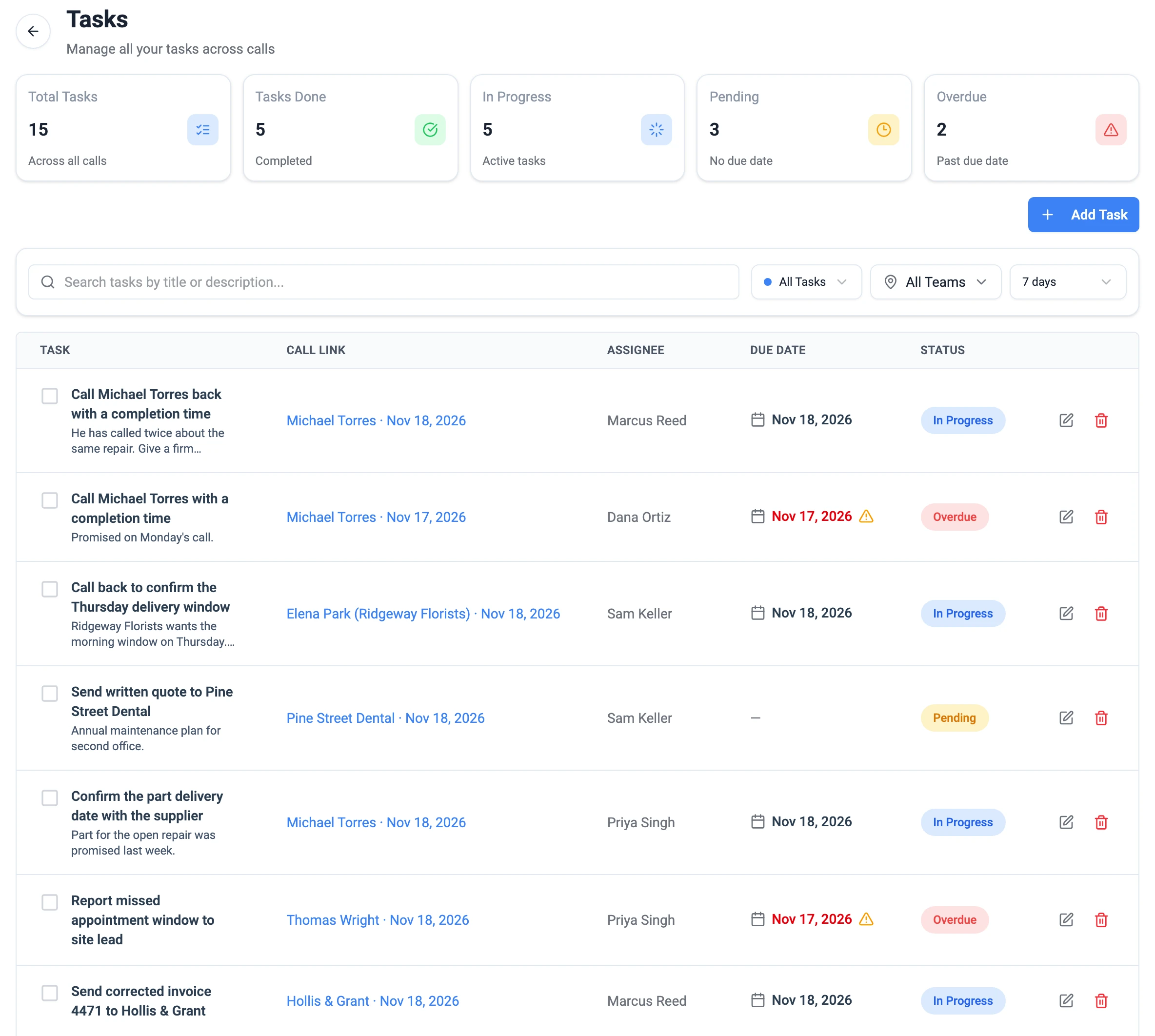
Each promise made on your team's calls is a task: the callback by three, the quote by Friday, the part confirmed with the supplier. The counts at the top say how many are done, in progress, pending and overdue.

The unowned ones get a name and a due date in the huddle. The person assigned gets the call that goes with it.

See After Call
The Tasks page in After Call. Counts across the top for total tasks, done, in progress, pending and overdue. Below, a list of tasks from the team's calls, each with the call it came from, the assignee, the due date, and a status of In Progress, Pending or Overdue, with overdue dates in red.

Friday morning, the week's calls arrive as reports.

Each manager gets the weekly Insights Hub reports for their teams, read from the whole week's calls. Each finding opens the call behind it.

Half an hour covers it. One call that was turned around, recognized in front of the team. One complaint driver picked to fix this week, and checked next Friday to see whether it shrank. One conversation to coach from, with the recording in front of you both.

The set: Churn (who may be leaving), Competitive Insights, Complaints - Product, Complaints - Service, Referenceable Calls (praise for your staff), Referenceable Customers (who to ask for a review) and Saved Calls.

All seven reports
Complaints - ServiceNov 13 to 19 · North site - Service

Six service complaints on this team this week. Four were about a missed appointment window.

DriverCallsWhat customers said
Missed appointments4Waited in for a technician who arrived late or not at all, with no call.
Scheduling a visit2Told someone would call with a time. Called back themselves a day later.

Each driver lists the calls behind it, with the team, the date and the customer's own words.

The topic climbing on your team shows up before anyone mentions it.

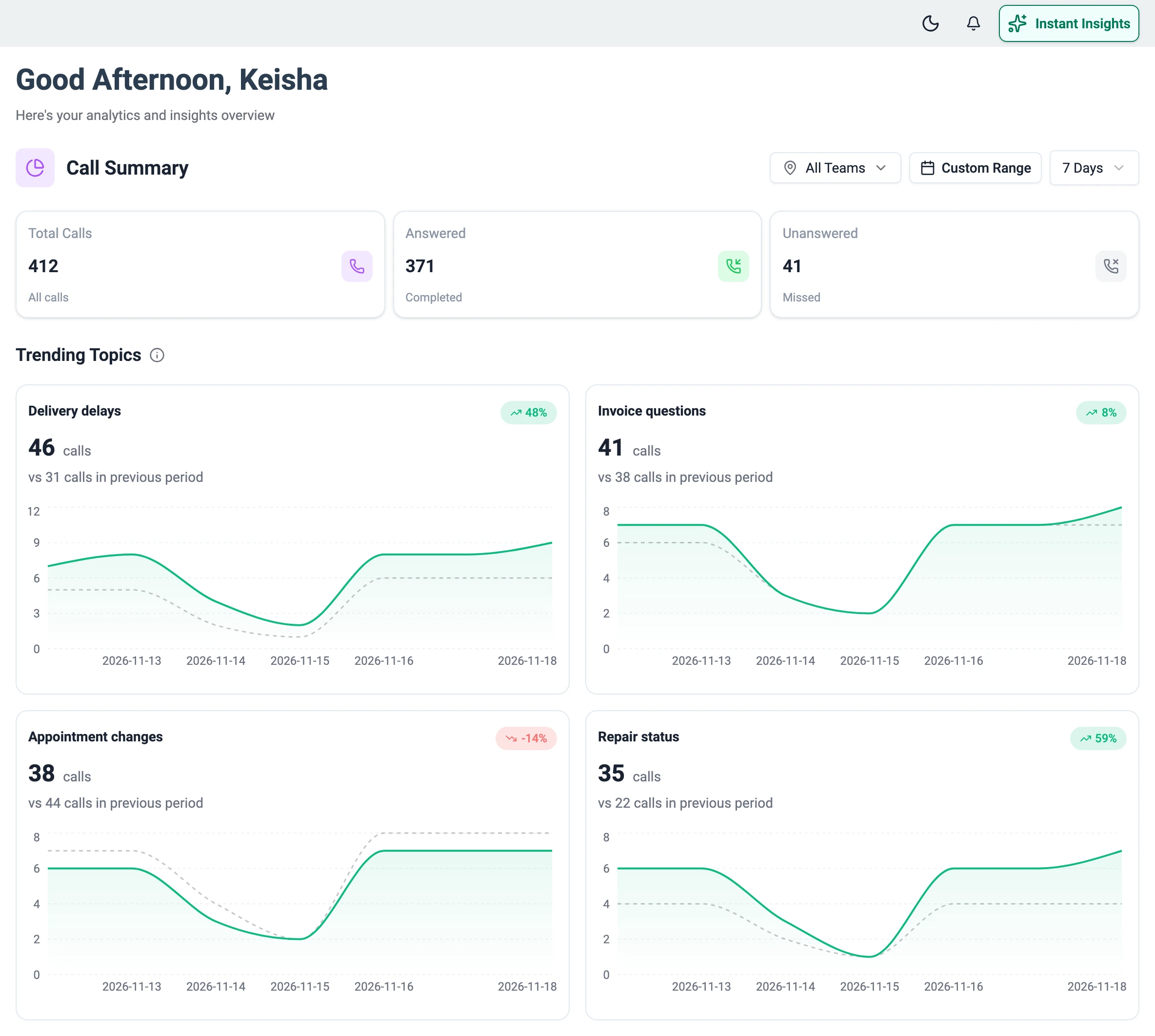
Insights Hub shows what your team's customers are calling about, and what is rising against last period. Any topic opens the calls inside it.

A manager who runs more than one team chooses one, several or all of them, and the numbers on the page follow.

See Insights Hub
Insights Hub signed in as Keisha, with a team filter and a date range at the top. Totals for all, answered and unanswered calls sit above Trending Topics: delivery delays, invoice questions, appointment changes and repair status, each with this period's calls against the previous period.

Next week's huddle can start from the task list.

Your provider sets up the teams, the rules and who receives them with you.

Talk to your provider