
Intelligence Cloud home

How teams use it

The promise you made is already on your list.

Within minutes of hang-up the summary is written, the promise you made is a task with your name on it, and the call is at the top of your list. At five, an email says what is still open.

Sam's Wednesday: four calls, two promises, no notes typed.

Sam Keller sells for the North site. Calls come back to back: a delivery to move, a quote to send, a customer who remembers a conversation differently.

After Call
  1. 9:58 am

    Elena Park from Ridgeway Florists wants Thursday's delivery moved to the morning. Sam checks the route and promises a callback by 3:00 pm.

    He listens to the customer instead of typing.

  2. 10:05 am

    The call is at the top of his list, summary written. The callback is a task with his name on it, and he sets it due at 3:00 pm.

    By then he is on the next call.

  3. 11:05 am

    Pine Street Dental asks about adding their second office. Sam promises a written quote by Friday. That is a task too.

  4. 2:26 pm

    Olivia Bennett says she was promised free delivery on her bulk order. Sam searches her number, opens last week's call and plays the moment. The promise was a discount, and now they both know it.

  5. 2:40 pm

    Dispatch confirms the morning slot. Sam calls Elena back and closes the task, twenty minutes early.

  6. 5:00 pm

    The end-of-day email lists today's calls and the one thing still open: the Pine Street Dental quote, due Friday.

Your list is your calls, newest first.

You see the calls on your own line, plus any call a colleague hands you. Each row carries the summary, how the call went and the tasks still open on it.

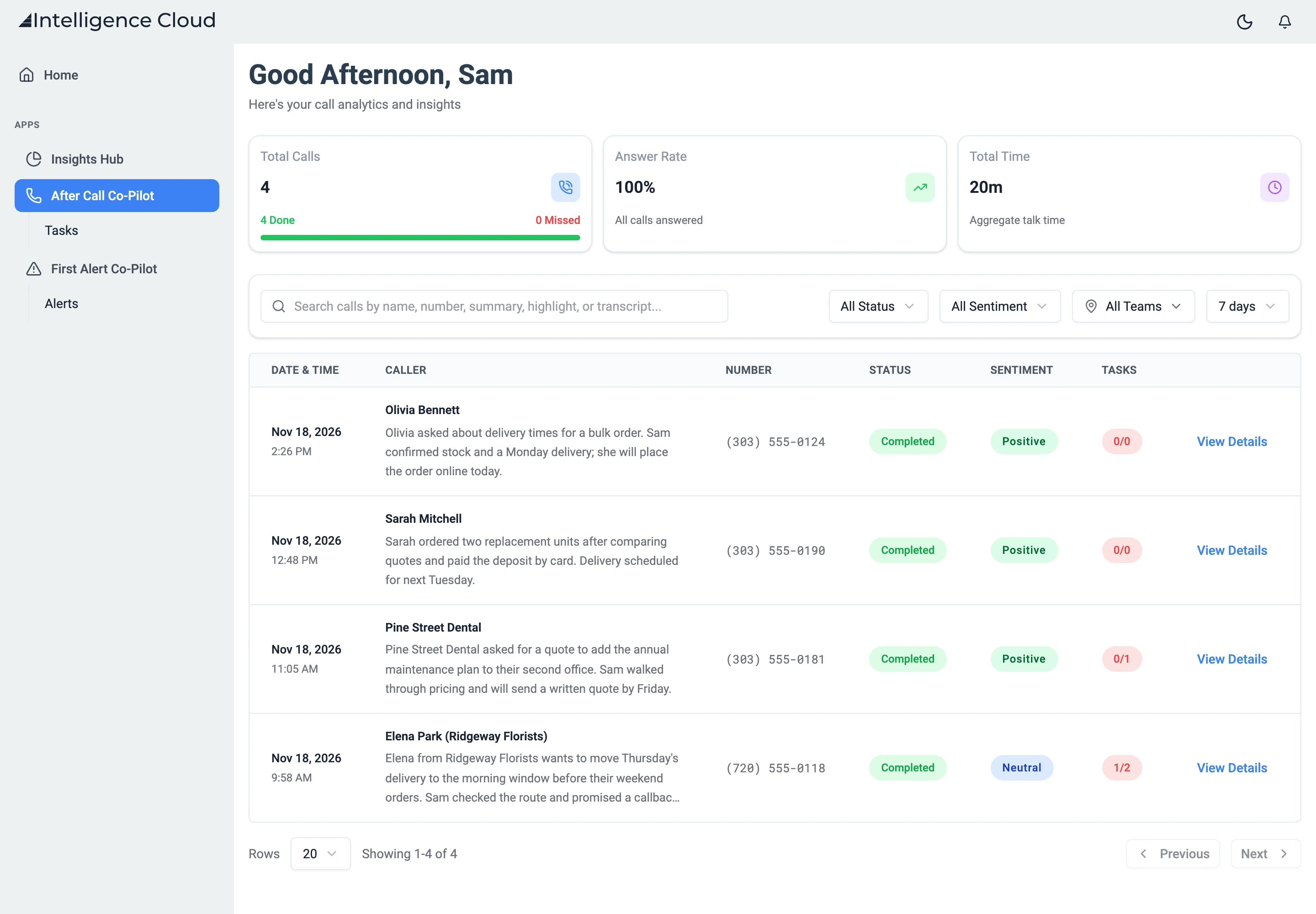
After Call signed in as Sam. Totals for his calls, answer rate and talk time sit above a search box with filters for status, sentiment, team and date. Below, his four calls today, each with the caller, a short summary, the number, a status of Completed, the sentiment and a count of open tasks.

Open a call and your promise sits under the summary.

The summary says who called, what they needed and how it ended. The key moments sit underneath, then each follow-up you agreed to, ready for a due date.

A follow-up the summary missed can be added by hand. A finished one gets a tick.

Copy Call Details puts the date, the people, the summary and the follow-ups on your clipboard, ready to paste into the order, the ticket or the customer record.

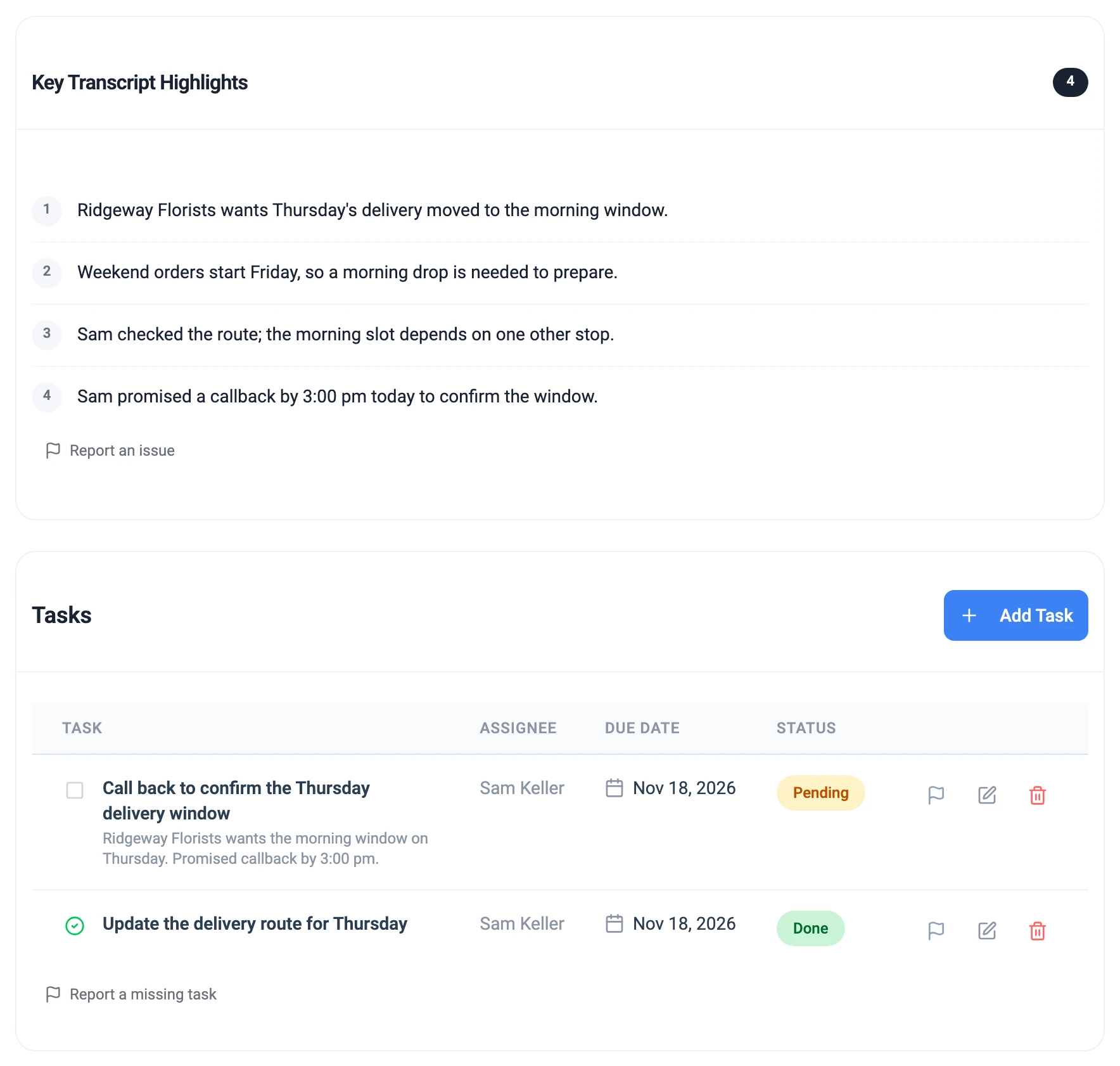
Part of a call open in After Call. The last key transcript highlights, including Sam's promise of a callback by 3:00 pm, and below them the call's tasks with an Add Task button: the callback, assigned to Sam Keller and pending, and a route update, done.

When a customer remembers it differently, the call settles it.

Search reads the calls you can see, the summaries and the full transcripts. Search a phone number and that person's calls come first.

By name or number
Each call with that customer, the newest at the top.
By what was said
A word or phrase from the call: a product, a date, "free delivery".
By a reference number
An order, account or ticket number read out on the call.
By what is still open
Filter to calls with tasks you have not closed.
The moment itself
The transcript at the point it was said, and the recording one click away.
In plain words
Ask your assistant which of your tasks are due today, or what a customer called about last week.

At five o'clock, the day arrives in your inbox.

The end-of-day email lists the calls you took and the tasks still open, so tomorrow starts with what is owed. Choose daily, weekly or both, and the time it arrives.

The other emails are yours to choose as well.

End of day
The calls you took and the tasks still open, at the hour you pick.
End of week
The same, for the whole week.
After each call
The summary and the follow-ups, minutes after you hang up.
A task for you
A note when a task is assigned to you, and a reminder before one falls due.

A call handed to you comes with the whole call.

When your manager assigns you an alert or a task, you get an email and a notice in the app. It opens the call behind it, with the summary, the transcript and the recording, even when the call came in to another team.

It goes to the person best placed to fix it. You play the moment, call the customer and resolve it with a note. Your manager sees it closed.

See First Alert

When a customer thanks Sam by name, his manager hears about it.

Each Friday your manager gets the calls where a customer praised the person who helped them, and the calls that opened with a frustrated customer and ended with a calm one.

The weekly reports
Referenceable CallsNov 13 to 19 · North site - Sales

Two calls on Sales this week where a customer praised the person who helped them.

CustomerHandled byWhat happened
Ridgeway FloristsSam KellerThursday's delivery moved to the morning, and the callback came before three as promised. Elena thanked him for remembering.
Pine Street DentalSam KellerAdding a plan for their second office because the first has run without a problem. Said Sam made it easy.

Each row opens the call, with the recording and the transcript.

Your manager sees the same call from the other side.

The task you closed shows as done on your manager's list. The alert you resolved shows who did it and when. Nobody has to ask whether the callback happened.

At five, the email says what you still owe.

Your provider switches it on for the lines on your team.

Talk to your provider